Complete step-by-step instructions for self-filing Sonic Vision as a micro entity ($65)
You must meet all three criteria under 37 CFR 1.29:
Prepare these before going to Patent Center. All must be in PDF format for electronic filing.
This is your main document. The full specification is ready — open it and use "Print / Save as PDF" to generate the filing document. It includes all 46 numbered paragraphs, 6 embedded figures, and the abstract. It must describe the invention in enough detail that someone skilled in the art could make and use it (35 U.S.C. §112(a)).
What to include (in order):
All 6 figures are ready and embedded in the specification. They are also available individually as SVGs below. Drawings are not strictly required for a provisional but are strongly recommended by the USPTO.
Figures to create:
Download: PTO/SB/16 (PDF)
Fill in the following fields:
Download: PTO/SB/15A (PDF)
This certifies your micro entity status. Fill in:
The ADS can be filled out online during the Patent Center submission. It captures:
Patent Center generates this form for you during the online filing process, so you don't need to prepare it separately.
Use this structure when expanding the .md file into a formal specification PDF:
PROVISIONAL PATENT APPLICATION

Title:  Adaptive Ambient Audio System Using Computer
        Vision for Real-Time Audience Detection,
        Behavioral Feedback Analysis, and Gesture-Based Control

Inventor(s): [Your Full Legal Name]
             [City, State, Country]

──────────────────────────────────────────────────

CROSS-REFERENCE TO RELATED APPLICATIONS
  None.

FIELD OF THE INVENTION
  [1-2 paragraphs: ambient audio, computer vision, ML, edge computing]

BACKGROUND OF THE INVENTION
  [2-3 pages: limitations of static playlists, manual DJ,
   Muzak-style services, existing emotion-detection patents
   and their shortcomings]

SUMMARY OF THE INVENTION
  [2-3 pages: overview of the 6-module system, the feedback
   loop innovation, and the key advantages]

BRIEF DESCRIPTION OF THE DRAWINGS
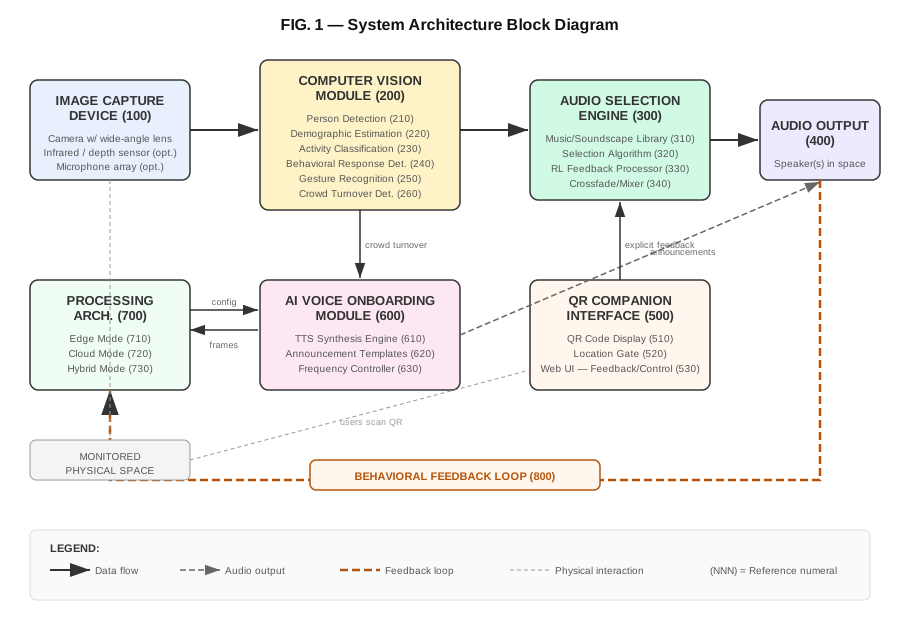
  FIG. 1 is a block diagram of the system architecture.
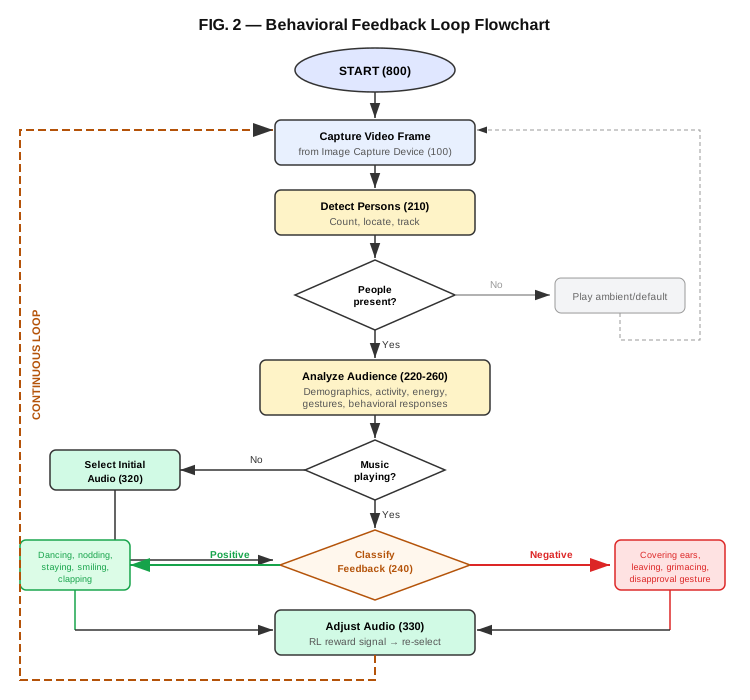
  FIG. 2 is a flowchart of the behavioral feedback loop.
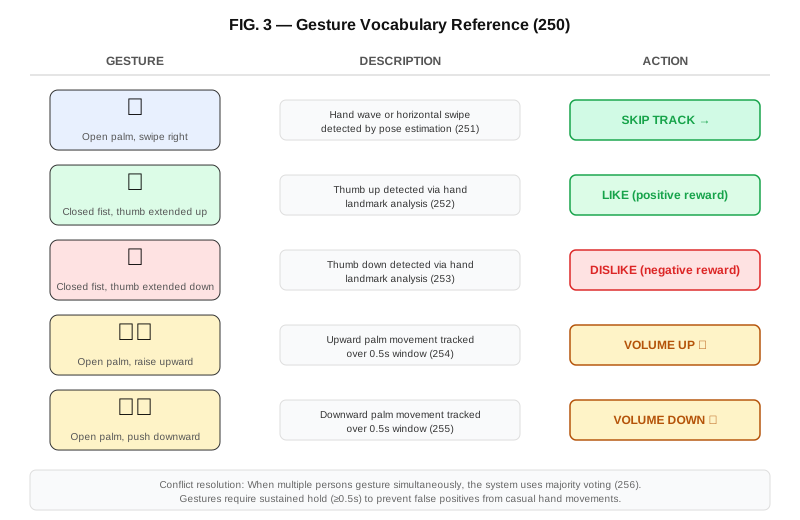
  FIG. 3 illustrates the gesture vocabulary.
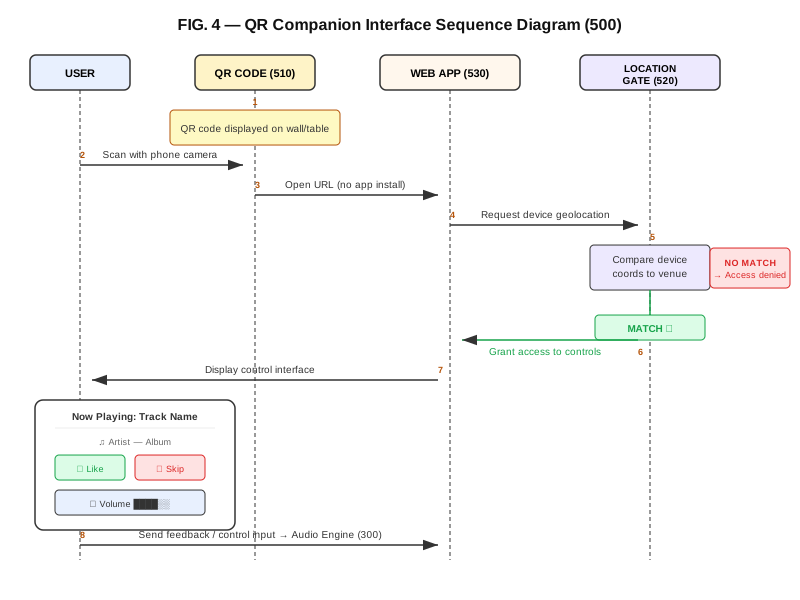
  FIG. 4 is a sequence diagram of the QR companion interface.
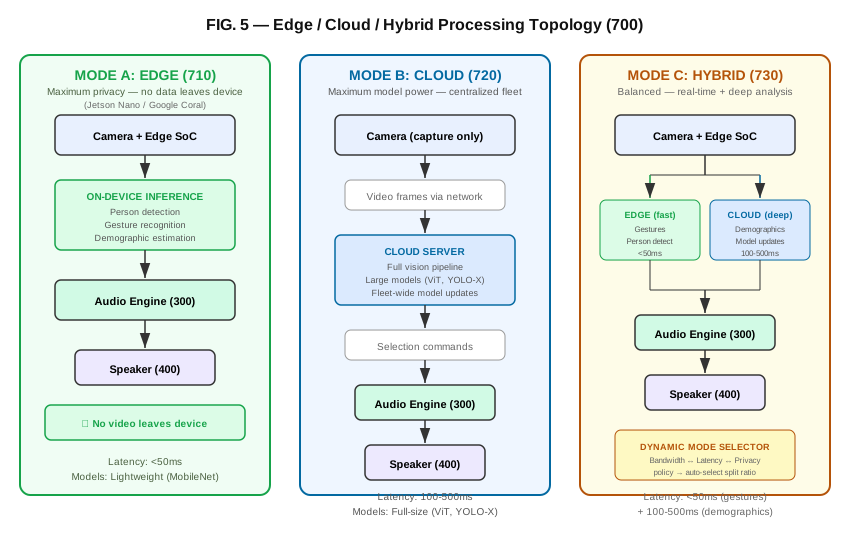
  FIG. 5 shows the edge/cloud/hybrid processing topology.
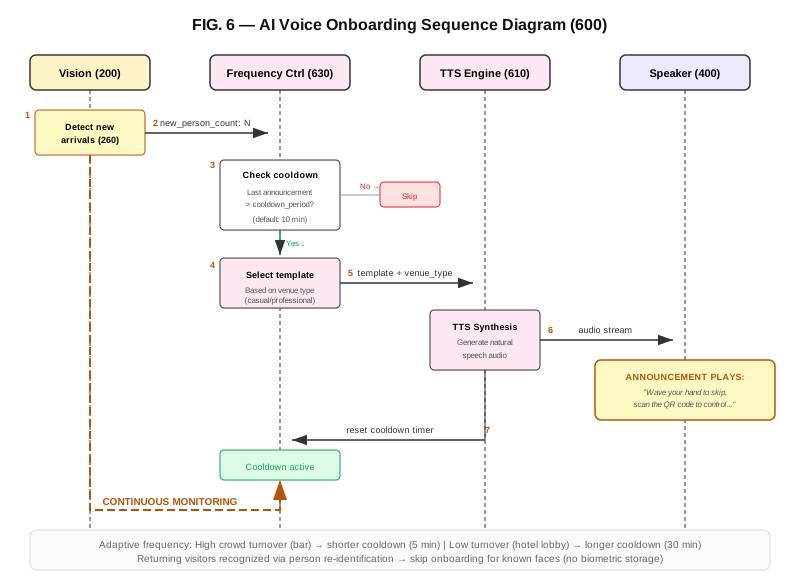
  FIG. 6 is a sequence diagram of the AI voice onboarding.

DETAILED DESCRIPTION OF PREFERRED EMBODIMENTS

  1. System Overview (reference FIG. 1)
     [2-3 pages]

  2. Vision Module
     [2-3 pages: person detection, demographics, activity
      recognition, behavioral feedback, gesture recognition]

  3. Audio Intelligence Engine
     [2-3 pages: music tagging, selection algorithm, RL]

  4. Audio Output System
     [1-2 pages: zone-aware playback, transitions, volume]

  5. QR-Based Companion Interface (reference FIG. 4)
     [2-3 pages: QR generation, location gating, web UI]

  6. AI Voice Onboarding (reference FIG. 6)
     [1-2 pages: synthesis, content, adaptive frequency]

  7. Processing Architecture (reference FIG. 5)
     [2-3 pages: edge, cloud, hybrid modes]

  8. Behavioral Feedback Loop (reference FIG. 2)
     [2-3 pages: positive/negative signals, RL rewards]

  9. Gesture Control (reference FIG. 3)
     [1-2 pages: supported gestures, conflict resolution]

  10. Use Cases
      [1-2 pages: restaurant, retail, gym, hotel, etc.]

ABSTRACT
  [150 words max — single paragraph summary]
Go to patentcenter.uspto.gov. Click "Create Account" or sign in with an existing USPTO account. You'll need to verify your email. This is a one-time setup.
Once logged in, click "New Submissions" in the left sidebar, then select "Utility — Provisional". This opens the provisional application submission wizard.
Under "Application Documents", click "Upload". Select your specification PDF. Set the document type to "Specification". The system accepts PDF, DOCX, and TIFF formats, but PDF is recommended.
Click "Upload" again. Select your drawings PDF. Set the document type to "Drawings". All figures should be in a single PDF file, numbered "1/6", "2/6", etc.
Upload your completed Form PTO/SB/16. Set the document type to "Provisional Cover Sheet".
Upload your completed Form PTO/SB/15A. Set the document type to "Certification of Micro Entity Status".
Patent Center has an integrated ADS form. Fill in: inventor name(s), address(es), citizenship, title of invention, correspondence address. For a single-inventor self-filing, this takes about 5 minutes.
Select "Micro Entity" as your entity status. The system will calculate your fee: $65. Verify this matches before proceeding.
Review all uploaded documents and form data. Check that inventor names, title, and documents are correct. You cannot amend a provisional after filing (except for regulatory compliance), so double-check everything.
Pay via credit card, debit card, EFT, or USPTO deposit account. Payment is processed immediately.
After payment, you'll receive an electronic filing receipt with your application number and filing date (your priority date). Save this PDF securely. You'll also receive an email confirmation.
You can now legally mark your invention as "Patent Pending". Set a calendar reminder for 10 months from your filing date to decide whether to convert to a non-provisional application.
| When | What | Action |
|---|---|---|
| Filing date | Priority date established | Save receipt securely |
| Month 1–9 | Build prototype, refine invention | Document improvements (can file continuation) |
| Month 10 | Decision point | Decide: convert to non-provisional, file new provisional, or let expire |
| Month 12 | Provisional expires | Must have filed non-provisional by this date to keep priority |
| Resource | Link |
|---|---|
| YOUR FILING DOCUMENTS (ready to print as PDF) | |
| Full Specification — 46 paragraphs, patent prose + 6 figures | View & Print as PDF |
| FIG. 1 — System architecture block diagram | View SVG |
| FIG. 2 — Behavioral feedback loop flowchart | View SVG |
| FIG. 3 — Gesture vocabulary reference | View SVG |
| FIG. 4 — QR companion interface sequence | View SVG |
| FIG. 5 — Edge/cloud/hybrid processing topology | View SVG |
| FIG. 6 — AI voice onboarding sequence | View SVG |
| Patent overview & claims | View overview |
| Raw specification (.md) | Download .md |
| USPTO FORMS & RESOURCES | |
| Patent Center (file here) | patentcenter.uspto.gov |
| Form PTO/SB/16 — Provisional cover sheet | Download PDF |
| Form PTO/SB/15A — Micro entity certification | Download PDF |
| Fee schedule (verify current fees) | USPTO fees |
| All patent forms | USPTO forms page |
| Drawing requirements (37 CFR §1.84) | Full regulation |
| Provisional patent overview | USPTO guide |
Complete every item before going to Patent Center: